
What are the common states of a process?
Interview preparation resource from Gate Smashers.
Common process states are: New (created but not yet admitted), Ready (waiting to be assigned the CPU), Running (executing on the CPU), Waiting/Blocked (waiting for I/O or an event), and Terminated (finished). Many systems also show extended states such as Suspended (swapped out), Zombie (terminated but not reaped), and Orphan (parent ended). Processes transition between these states by events like admit, dispatch, preemption, I/O wait/complete, exit, and wakeup.
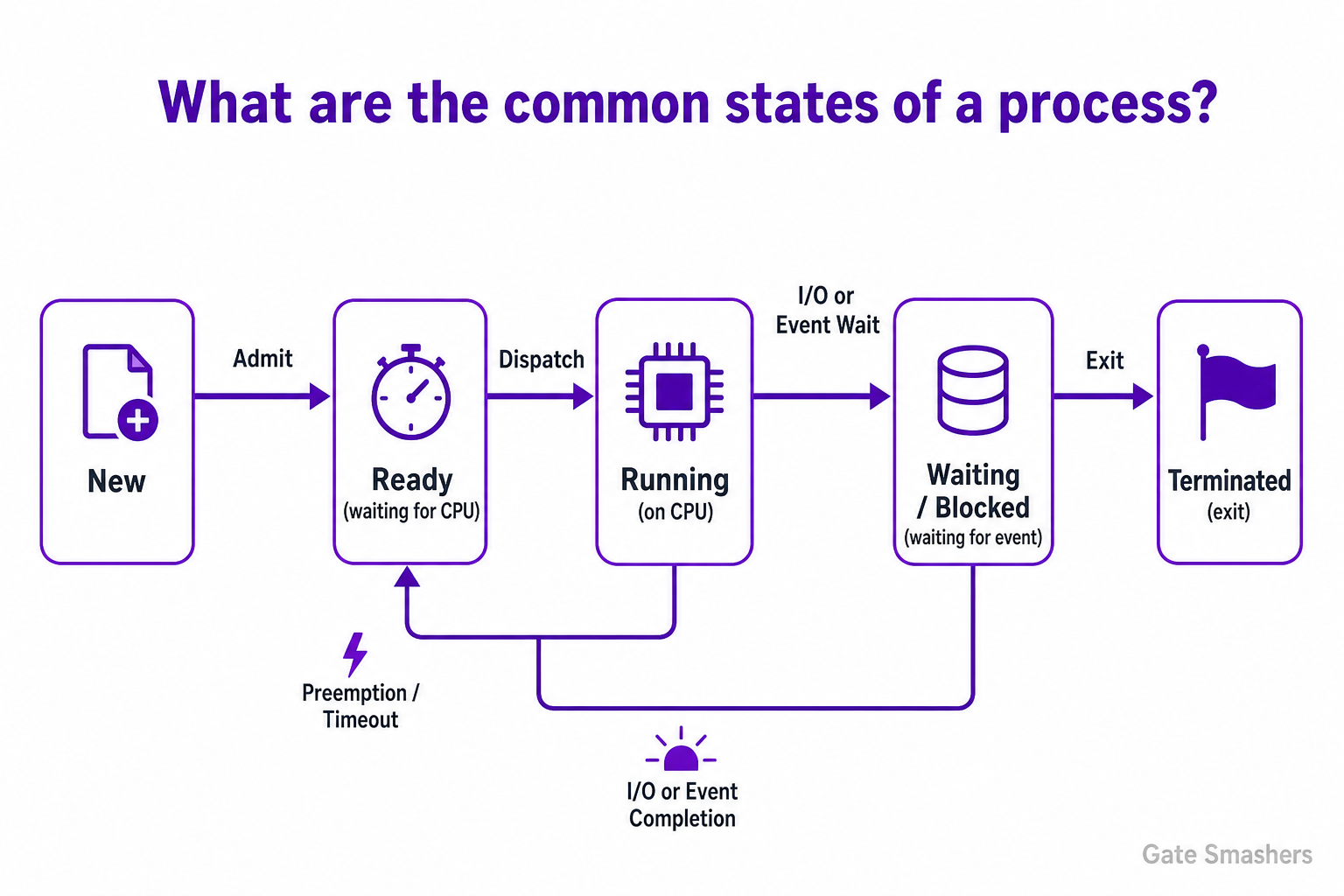
Overview
A process state is an abstraction the operating system uses to track what a process is doing and what resources it needs. States let the OS make scheduling and resource decisions without inspecting process code.
Understanding states and transitions is key for reasoning about scheduling, context switches, blocking behavior and process lifecycle management.
Primary process states
Most textbooks and OS implementations use a small core set of states to describe a process lifecycle. These cover creation through execution to termination and are sufficient for basic scheduling and resource management.
- New: Process has been created but not yet admitted to the ready queue (e.g., allocation of PCB and resources pending).
- Ready: Process is prepared to run and waiting in a ready queue for CPU allocation; all needed resources (except CPU) are available.
- Running: Process instructions are executing on the CPU; exactly one per core on a uniprocessor system.
- Waiting / Blocked: Process cannot proceed until some event occurs (I/O completion, signal, semaphore). It is not eligible for the CPU while blocked.
- Terminated (Exit): Process has finished execution or been killed. Resources are released after cleanup; the process may briefly remain as a zombie until parent reaps it.
State transitions and triggers
Transitions occur when events change a process’s readiness to run. The scheduler and kernel perform actions like dispatch, preemption, blocking, and cleanup to move processes between states.
Common triggers are simple and map directly to transitions the scheduler implements.
- Admit: New → Ready when the OS finishes creating the process and places it in the ready queue.
- Dispatch: Ready → Running when the scheduler assigns the CPU to the process.
- Timeout / Preemption: Running → Ready when a running process’s time slice expires or a higher-priority process arrives.
- I/O or Event Wait: Running → Waiting when the process requests I/O or waits for a synchronization event.
- I/O Completion / Event Signal: Waiting → Ready when the awaited event occurs, making the process eligible for the CPU.
- Exit: Running → Terminated when the process completes or is killed; cleanup and parent notification follow.
Extended and special states
Real operating systems have additional states to handle memory management, parent-child relationships, and cleanup semantics. These are useful for swap management and correct process termination handling.
Knowing these helps debug issues like zombies, orphaned processes, and suspension behavior.
- Suspended (Swapped): A Ready or Waiting process can be swapped out to disk to free memory; it stays suspended until swapped back in and placed in the appropriate queue.
- Zombie: After termination, the process remains as a minimal entry (zombie) so the parent can read its exit status; it is removed after the parent calls wait().
- Orphan: A child whose parent has terminated; typically adopted by the init/systemd process which reaps it to avoid zombies.