
01What is an operating system, and what are its main responsibilities?
An operating system is system software that manages hardware resources and provides safe, convenient services to applications. It acts as the controlled bridge between programs and the hardware.
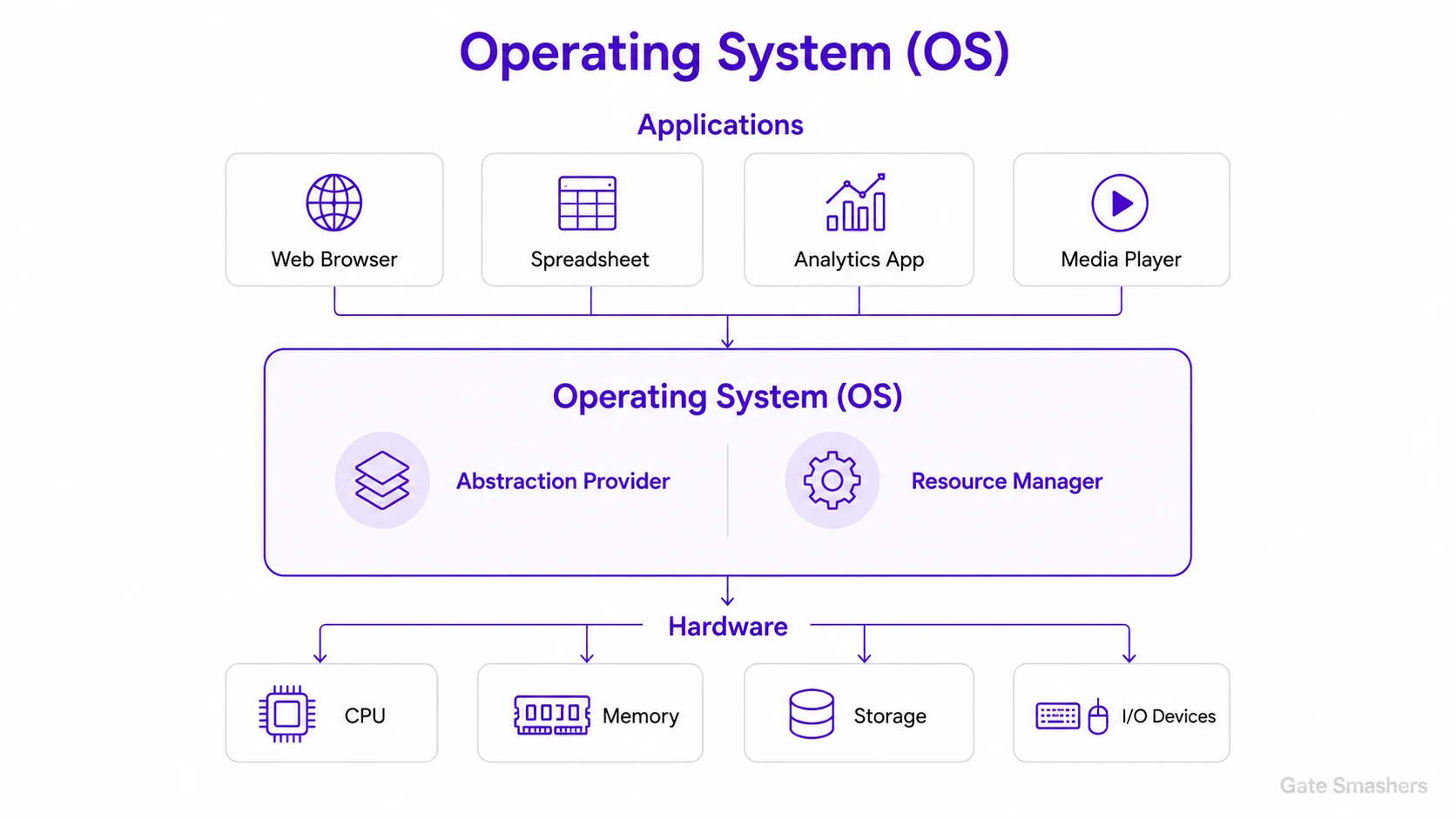
Without an operating system, every application would need to understand the details of the processor, memory, disks and input/output devices. The OS hides those differences behind standard abstractions such as processes, files, sockets and virtual memory.
It also decides how limited resources are shared. The scheduler distributes CPU time, the memory manager assigns RAM, the file system organises persistent data and device drivers communicate with hardware. Protection mechanisms prevent one program from reading or damaging another program's data.
A useful way to remember the OS is as both a resource manager and an abstraction provider. It manages the physical machine while presenting simpler logical views to programs, allowing applications to remain portable and users to run many tasks safely at the same time.
02What is the difference between user mode and kernel mode?
User mode runs applications with restricted privileges, while kernel mode allows the operating system to execute privileged instructions and control hardware. A controlled trap, interrupt or exception moves execution into the kernel.
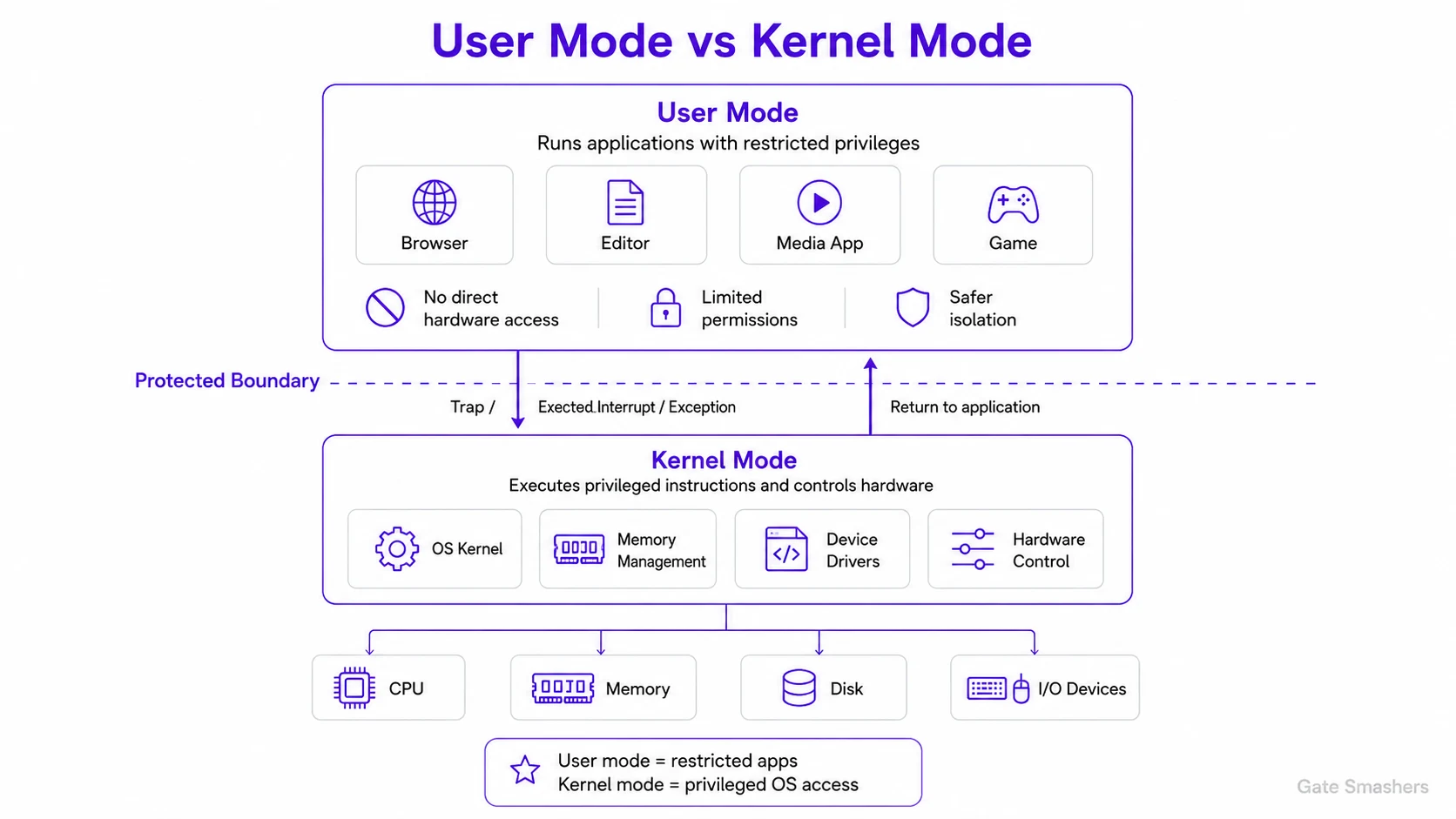
Modern processors provide privilege levels so an ordinary application cannot directly change page tables, disable interrupts or access devices. This restriction limits the damage caused by a faulty or malicious program.
When an application needs a protected service, it makes a system call. The CPU switches to kernel mode at a predefined entry point, the OS validates the request, performs the operation and returns to user mode. Kernel failures are more serious because the kernel is shared by the whole system.
For example, a text editor may request that a file be saved, but it cannot write arbitrary disk sectors itself. It enters the kernel through a system call, the kernel checks the request, performs the protected operation and then returns control to the editor in user mode.
03What is a system call, and what happens when one is executed?
A system call is the controlled interface through which a user program requests a kernel service. The request traps into the kernel, is validated and executed, and then returns a result or error to the process.
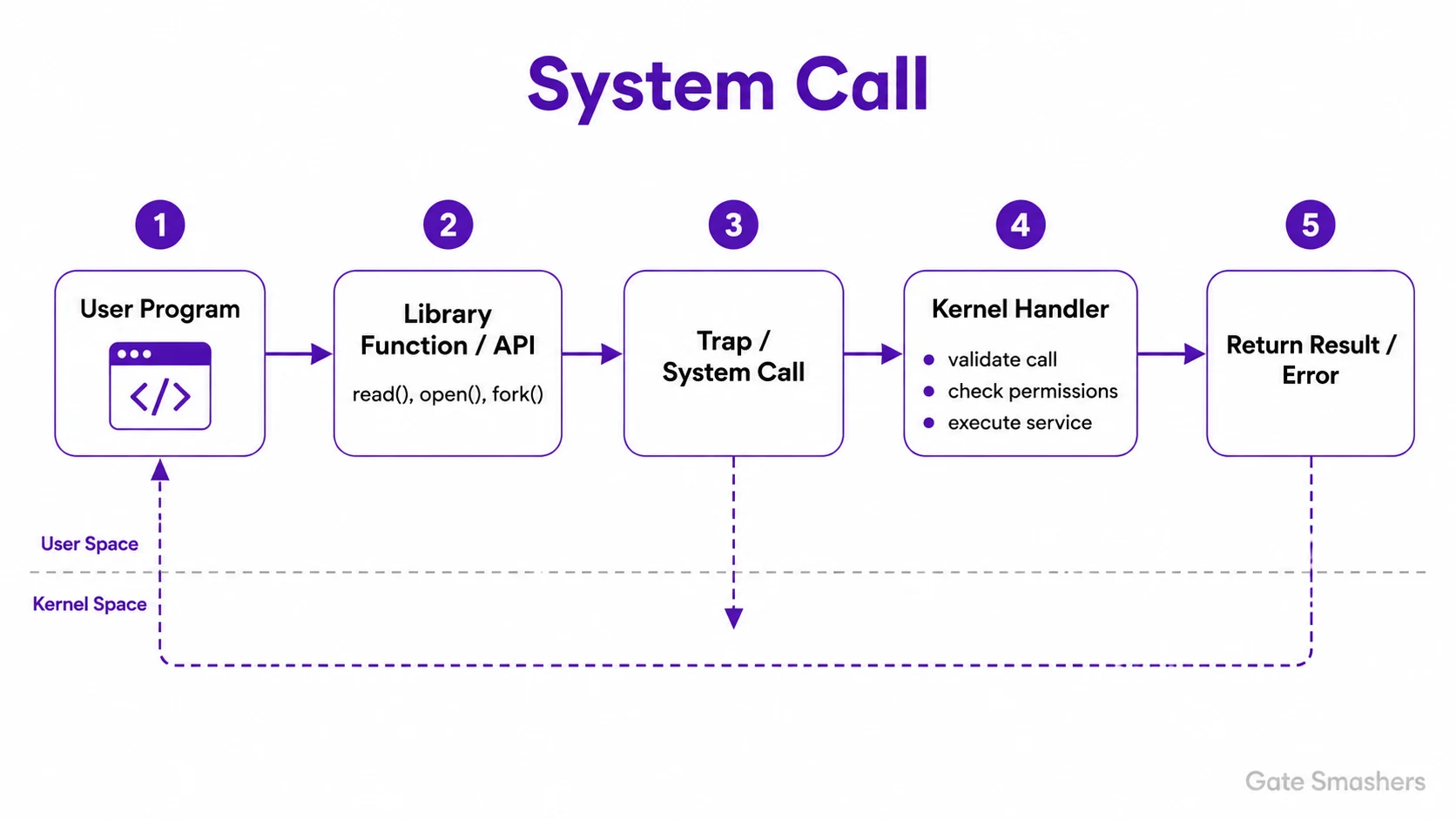
A program normally calls a library function such as read(), open() or fork(). The wrapper places the system-call number and arguments where the operating system expects them, then executes a special trap instruction.
The CPU saves the current user context, changes privilege level and jumps to the kernel's system-call handler. The kernel checks the call number, permissions, addresses and arguments before performing the work. It then stores the return value, restores user execution and continues after the original call.
The important interview point is that a system call is not an ordinary function call. It crosses a protection boundary and therefore requires validation and a privilege transition. This extra work makes it safer, but also more expensive than calling a function entirely within user space.
04What is the difference between a program and a process?
A program is a passive file containing instructions, while a process is a running instance of that program with an execution state, memory, resources and an operating-system identity.
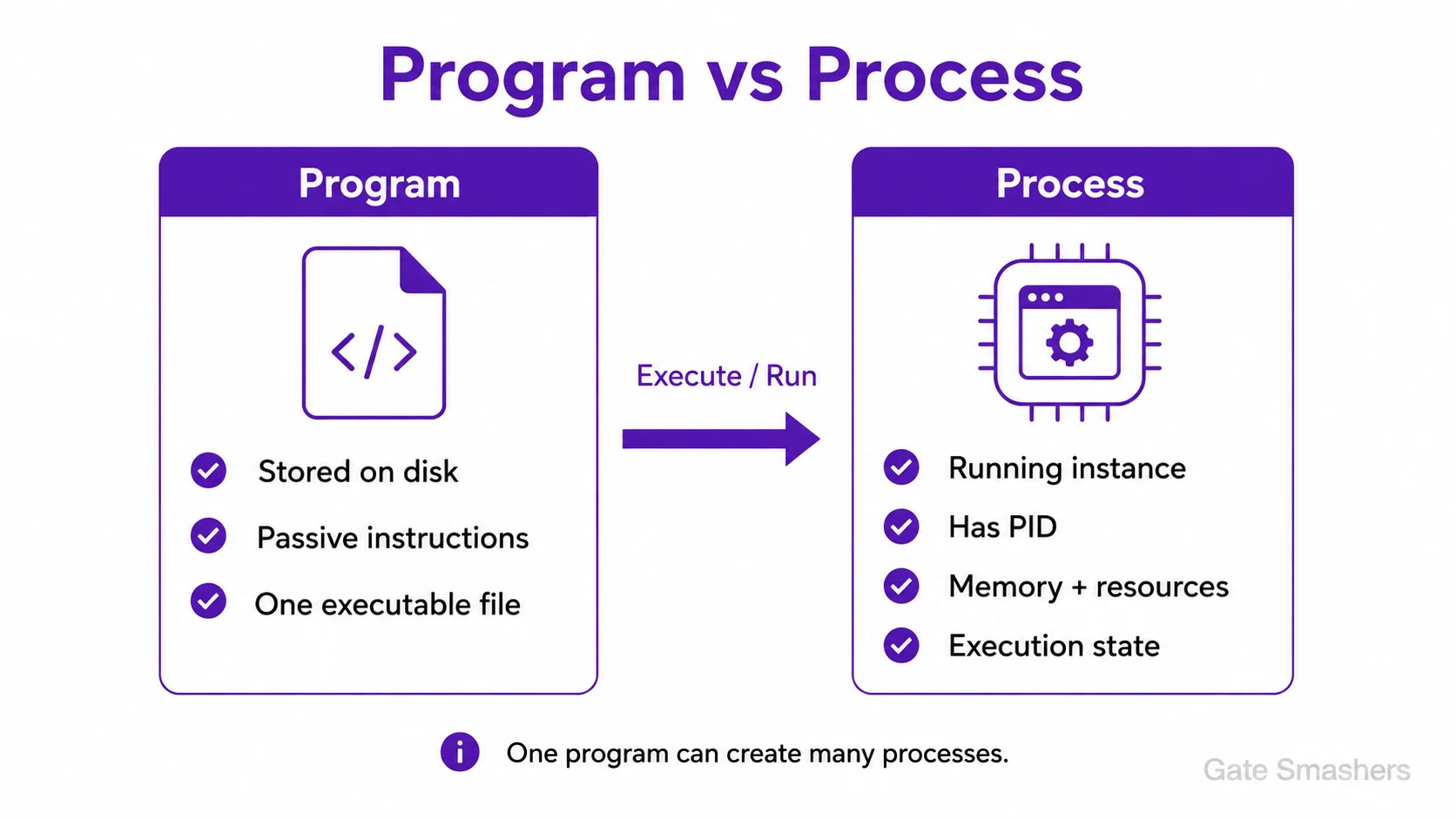
The executable stored on disk does not have a program counter, CPU registers or allocated runtime memory. When it is launched, the OS creates a process, maps the executable into an address space and prepares the stack, heap and other runtime structures.
The same program can create many processes. Opening a browser several times may run multiple process instances from the same executable, but every process has its own identifier and protected execution state.
For example, a browser executable is a program stored on disk. When you launch it, the OS creates a process with its own PID, address space, open files and scheduling information. Launching it again can create another independent process from the same program file.
05What is the difference between a process and a thread?
A process is a protected resource container with its own address space, while a thread is an execution path inside that process. Threads share process resources but keep their own registers, program counter and stack.
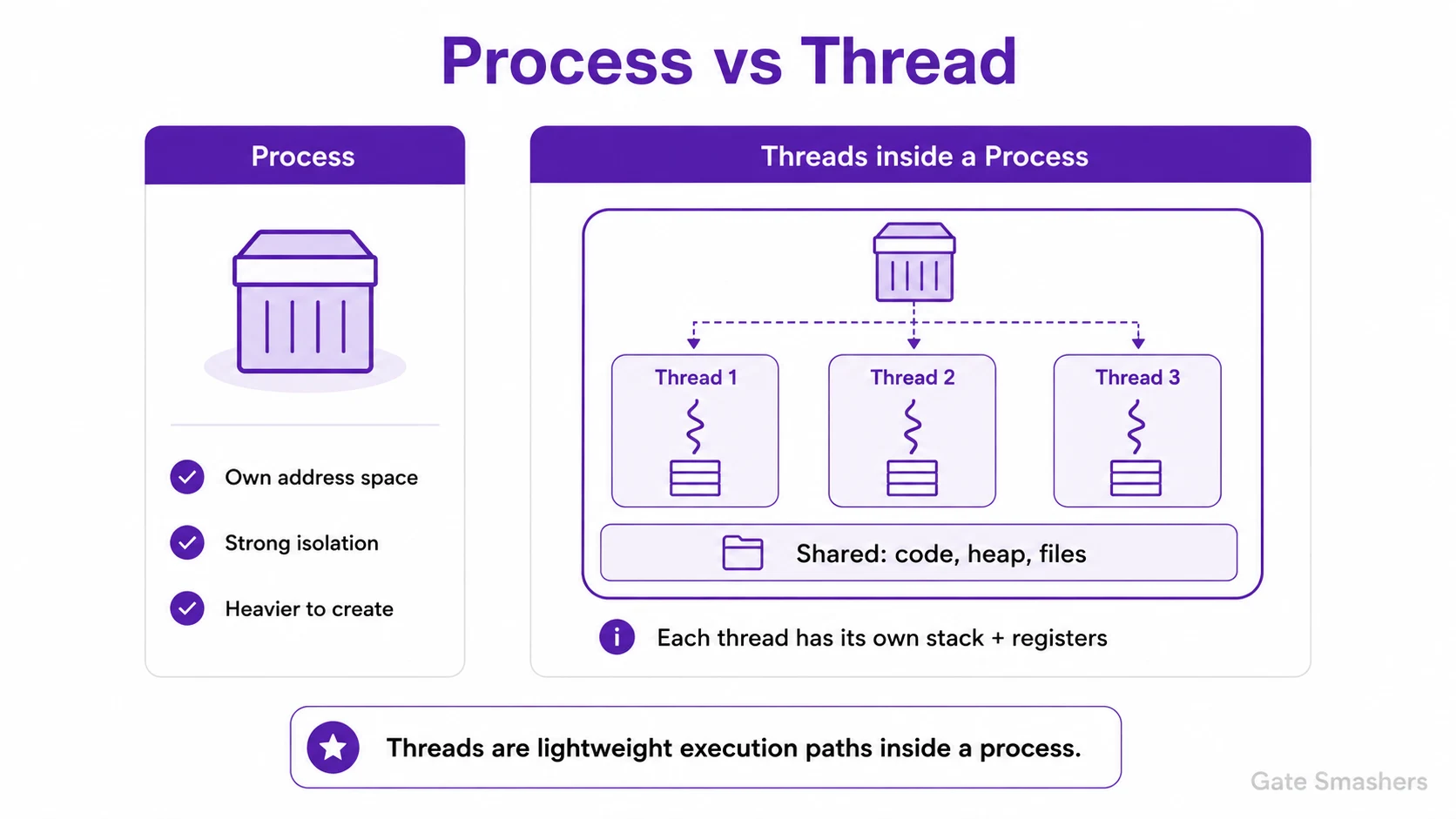
Processes provide isolation. A failure in one process normally does not corrupt another process because their virtual address spaces are separate. Communication between processes therefore needs an IPC mechanism.
Threads are lighter because threads in the same process share code, heap and open files. This makes communication fast, but it also creates synchronization problems: one faulty thread can corrupt shared data or crash the complete process.
A web server illustrates the trade-off well. Multiple threads can handle requests efficiently because they share cached data, but access to that data must be synchronized. Separate processes provide stronger isolation, although communication and context switching are generally more expensive.
06What are the common states of a process?
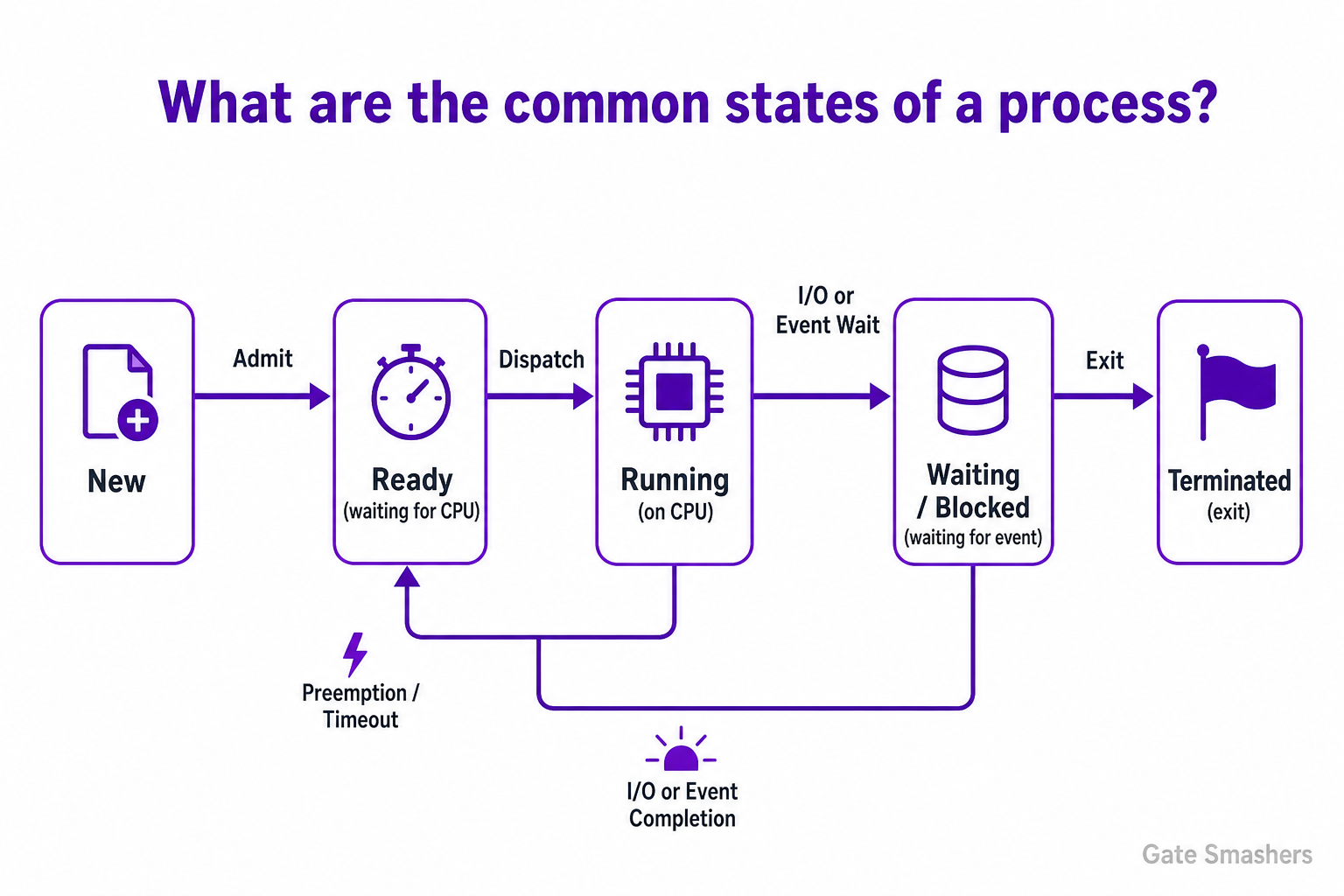
Common process states are: New (created but not yet admitted), Ready (waiting to be assigned the CPU), Running (executing on the CPU), Waiting/Blocked (waiting for I/O or an event), and Terminated (finished). Many systems also show extended states such as Suspended (swapped out), Zombie (terminated but not reaped), and Orphan (parent ended). Processes transition between these states by events like admit, dispatch, preemption, I/O wait/complete, exit, and wakeup.
Overview
A process state is an abstraction the operating system uses to track what a process is doing and what resources it needs. States let the OS make scheduling and resource decisions without inspecting process code.
Understanding states and transitions is key for reasoning about scheduling, context switches, blocking behavior and process lifecycle management.
Primary process states
Most textbooks and OS implementations use a small core set of states to describe a process lifecycle. These cover creation through execution to termination and are sufficient for basic scheduling and resource management.
- New: Process has been created but not yet admitted to the ready queue (e.g., allocation of PCB and resources pending).
- Ready: Process is prepared to run and waiting in a ready queue for CPU allocation; all needed resources (except CPU) are available.
- Running: Process instructions are executing on the CPU; exactly one per core on a uniprocessor system.
- Waiting / Blocked: Process cannot proceed until some event occurs (I/O completion, signal, semaphore). It is not eligible for the CPU while blocked.
- Terminated (Exit): Process has finished execution or been killed. Resources are released after cleanup; the process may briefly remain as a zombie until parent reaps it.
State transitions and triggers
Transitions occur when events change a process’s readiness to run. The scheduler and kernel perform actions like dispatch, preemption, blocking, and cleanup to move processes between states.
Common triggers are simple and map directly to transitions the scheduler implements.
- Admit: New → Ready when the OS finishes creating the process and places it in the ready queue.
- Dispatch: Ready → Running when the scheduler assigns the CPU to the process.
- Timeout / Preemption: Running → Ready when a running process’s time slice expires or a higher-priority process arrives.
- I/O or Event Wait: Running → Waiting when the process requests I/O or waits for a synchronization event.
- I/O Completion / Event Signal: Waiting → Ready when the awaited event occurs, making the process eligible for the CPU.
- Exit: Running → Terminated when the process completes or is killed; cleanup and parent notification follow.
Extended and special states
Real operating systems have additional states to handle memory management, parent-child relationships, and cleanup semantics. These are useful for swap management and correct process termination handling.
Knowing these helps debug issues like zombies, orphaned processes, and suspension behavior.
- Suspended (Swapped): A Ready or Waiting process can be swapped out to disk to free memory; it stays suspended until swapped back in and placed in the appropriate queue.
- Zombie: After termination, the process remains as a minimal entry (zombie) so the parent can read its exit status; it is removed after the parent calls wait().
- Orphan: A child whose parent has terminated; typically adopted by the init/systemd process which reaps it to avoid zombies.
07What is a Process Control Block (PCB)?
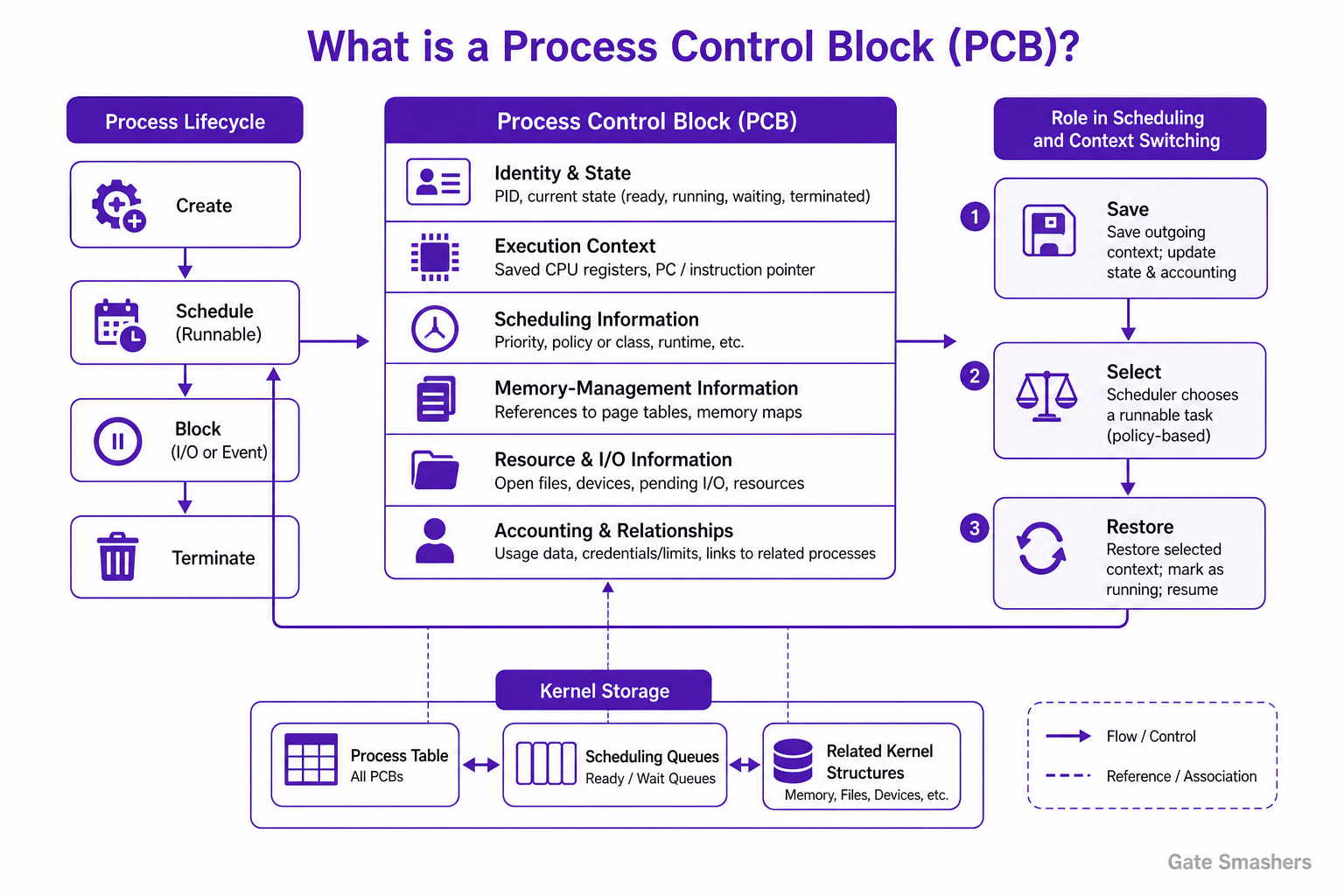
A Process Control Block (PCB) is a kernel-maintained data structure that represents a process and stores the information the operating system needs to manage it. It typically includes the process’s identity, state, scheduling information, memory-management information, resource references, and saved execution context needed when the process is stopped and later resumed.
Purpose
The operating system creates and maintains a PCB for each process. It uses this record to track the process throughout its lifetime, including creation, scheduling, blocking for an event or I/O, and termination.
The exact PCB layout is operating-system-specific. In systems that schedule threads independently, some execution-context and scheduling information may be kept in a separate thread control block rather than solely in the process PCB.
Typical information in a PCB
A PCB commonly contains references to information required for process management. Some data may be stored directly in the PCB, while other data is held in related kernel structures.
- Identity and state: A process identifier and the current state, such as ready, running, waiting, or terminated.
- Execution context: Saved CPU register values, including the program counter or instruction pointer, so execution can continue at the correct instruction.
- Scheduling information: Priority, scheduling policy or class, and runtime information used by the scheduler.
- Memory-management information: References to structures that describe the process address space, such as page tables or memory maps.
- Resource and I/O information: References to open files, devices, pending I/O, and other resources owned or used by the process.
- Accounting and relationships: Resource-usage data, credentials or limits, and links to related processes where supported by the operating system.
Role in scheduling and context switching
When the operating system switches the CPU from one runnable execution context to another, it saves the outgoing context and restores the incoming context. The PCB, or associated thread-level structures, provides the kernel with the information needed for this operation.
The scheduler consults process- or thread-related state and scheduling fields to select a runnable task. The kernel then restores the selected task's saved context and marks it as running.
- Save: Save the outgoing execution context and update its state and accounting information.
- Select: Choose a runnable task according to the system's scheduling policy.
- Restore: Restore the selected task's execution context and resume it.
Kernel storage
PCBs are kernel data structures and are protected from direct modification by ordinary user programs. Operating systems organize them using process tables and scheduling or wait queues, with the exact organization depending on the implementation.
Their size, fields, and relationships with other kernel structures vary by operating system and hardware architecture.
08What is a context switch, and why is it considered overhead?
A context switch changes the CPU from one task to another by saving the outgoing execution state and restoring the incoming state. It is overhead because the switch itself completes no application work.
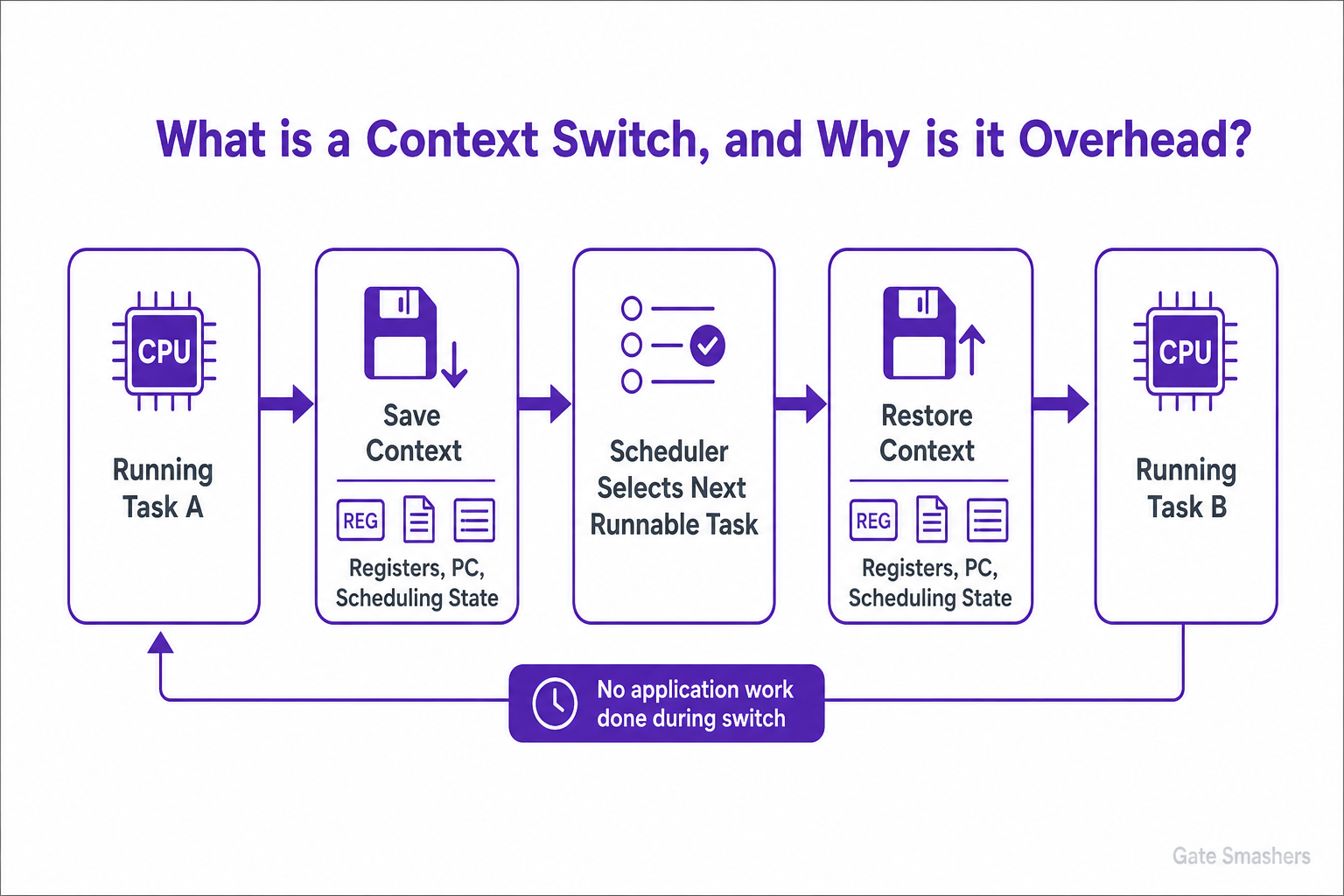
The OS saves registers, program counter and scheduling state for the outgoing task, chooses another runnable task and restores its saved context. Depending on the switch, address-space and privilege-related state may also change.
The direct save-and-restore cost is only part of the overhead. The incoming task may suffer cold CPU caches, branch-predictor disruption and TLB misses. Excessive switching therefore reduces useful throughput even when each individual switch appears short.
The cost comes from saving and restoring registers, changing memory mappings and disturbing CPU caches or translation buffers. A thread switch within one process is often cheaper because the address space may remain unchanged, although it still has scheduling overhead.
09What is the difference between preemptive and non-preemptive scheduling?
In preemptive scheduling, the OS may interrupt a running task and give the CPU to another task. In non-preemptive scheduling, a task keeps the CPU until it finishes or blocks voluntarily.
Preemption improves responsiveness and lets high-priority or interactive work run quickly, but it causes more context switches and requires careful synchronization around shared data.
Non-preemptive scheduling is simpler and has lower switching complexity, but one long task can delay every task behind it. Round Robin and SRTF are common preemptive algorithms; FCFS and non-preemptive SJF are common non-preemptive examples.
Preemption improves responsiveness because a long-running task cannot keep the CPU indefinitely. Non-preemptive scheduling is simpler and can reduce switching overhead, but one slow or blocked task may delay others. Modern general-purpose systems therefore normally use preemptive scheduling.
10What is the difference between fork() and exec()?
fork() creates a new child process, while exec() replaces the current process image with a new program. Shells commonly fork first and then call exec in the child.
After fork(), parent and child continue from the next instruction but receive different return values. The child gets a new process ID. Modern systems initially share physical pages using copy-on-write, so memory is copied only when one process modifies a shared page.
exec() does not normally create another process. It replaces the current code, data, heap and stack with a new executable while keeping the same process identity. If exec succeeds, it does not return to the old program.
The key distinction is that fork() preserves the current program image in a new process, whereas exec() replaces the caller's image. A command shell commonly forks, lets the child call exec() for the requested command, and keeps the parent shell available for the next command.
11What are zombie and orphan processes?
A zombie is a process that has finished but still has a process-table entry because its parent has not collected the exit status. An orphan is a still-running process whose parent terminated first.
When a child terminates, the kernel keeps a small record containing its PID and exit status until the parent calls wait() or a related function. During this period the child is a zombie: it executes no instructions and consumes no CPU, but too many zombies can exhaust process-table entries.
An orphan has not terminated. The operating system reparents it to a designated system process, which later collects its exit status. Orphans can continue doing normal work; zombies cannot because their execution has already ended.
The OS must still retain enough information to report the child's termination status to its parent, which creates a zombie. An orphan is different because it is still running; the system simply gives another process responsibility for eventually collecting its status.
12What is the difference between concurrency and parallelism?
Concurrency means multiple tasks make progress during overlapping periods, while parallelism means multiple tasks execute at the same instant on different processing units.
A single CPU core can support concurrency by rapidly interleaving tasks. Only one instruction stream may execute at a moment, but switching between tasks allows an application to remain responsive while other work waits for input or output.
Parallelism normally requires multiple cores, processors or execution units. It can reduce completion time when work can be divided into independent parts, but it also introduces coordination, synchronization and load-balancing costs.
Concurrency is possible even on one CPU because tasks can be interleaved, while parallelism requires simultaneous execution resources such as multiple cores. A concurrent design may become parallel when hardware permits, but it must still be correct when operations are only interleaved.
13What is a race condition, and what is a critical section?
A race condition occurs when a result depends on the unpredictable timing of concurrent operations. A critical section is the code that accesses shared mutable data and therefore needs controlled synchronization.
Consider two threads incrementing the same counter. An increment is usually a read-modify-write sequence rather than one indivisible action. If both threads read the old value before either writes the new value, one update can be lost.
Mutual exclusion, semaphores, atomic operations or carefully designed lock-free algorithms can protect the critical section. Synchronization should cover the smallest correct region because an unnecessarily large critical section reduces concurrency.
Suppose two threads increment the same counter by reading, adding and writing. If both read the old value before either write occurs, one increment is lost. Protecting that read-modify-write sequence as a critical section makes the operation appear indivisible to competing threads.
14What is the difference between a mutex and a semaphore?
A mutex is an ownership-based lock used to protect a critical section. A semaphore is an atomic counter used to represent available resources or signal events between tasks.
A mutex normally has two states: locked and unlocked. The thread that locks it is expected to unlock it. This ownership rule makes a mutex suitable for protecting shared data and lets implementations provide features such as priority inheritance.
A counting semaphore can allow up to N users of a resource, while a binary semaphore has values similar to zero and one. Semaphores do not require the same task to perform wait and signal, so they can also coordinate producer-consumer and event-notification workflows.
A mutex is normally preferred when a specific thread must own and release a lock. A semaphore is useful when access is controlled by a count, such as allowing only five tasks to use a resource pool. Both require careful use to avoid deadlock and starvation.
15What is deadlock, and what four conditions are required for it?
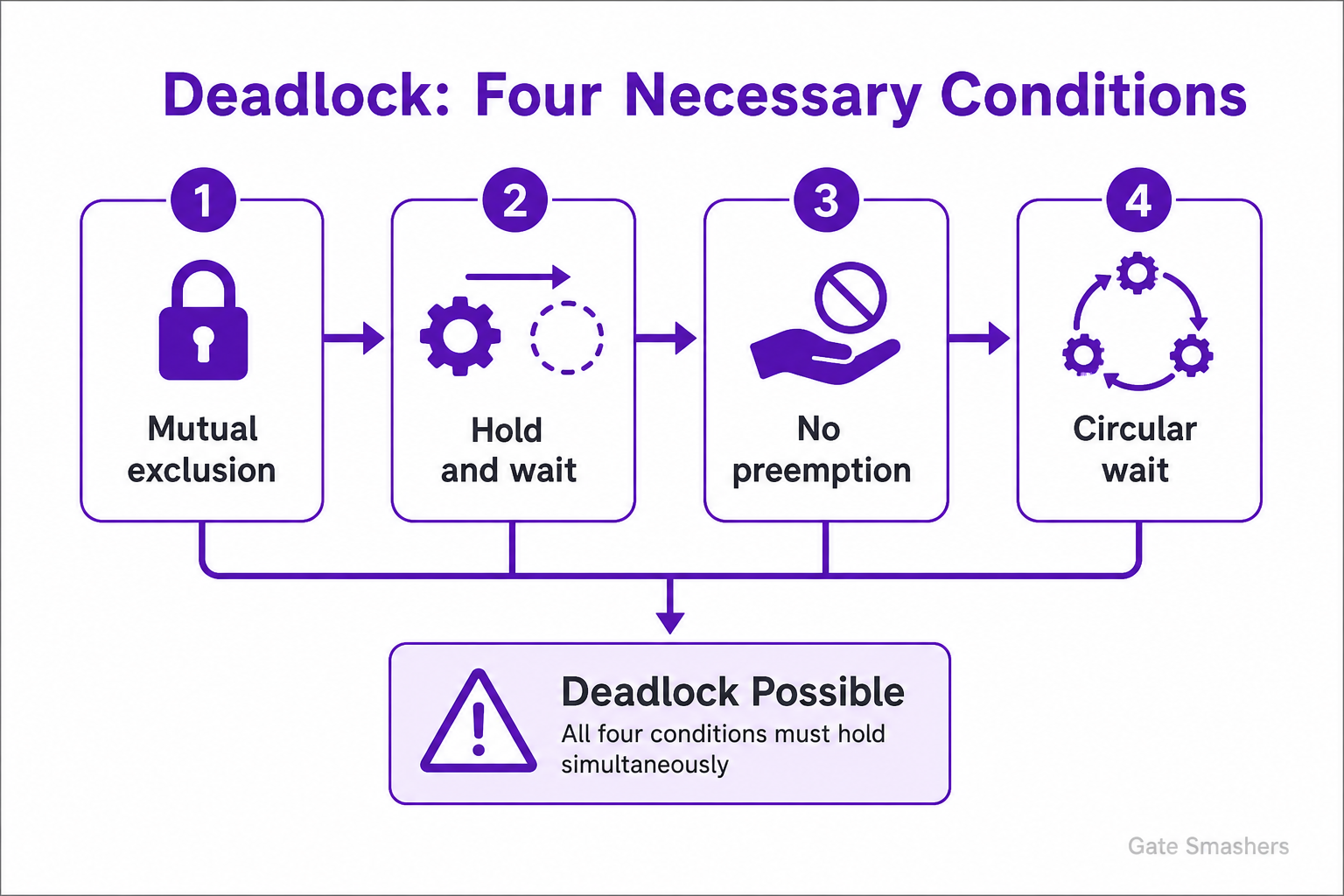
Deadlock is a state in which two or more processes or threads are indefinitely blocked because each is waiting for a resource or event that another member of the set must provide. The four Coffman conditions required for deadlock are mutual exclusion, hold and wait, no preemption, and circular wait. All four are necessary; preventing any one of them prevents deadlock, although their presence alone does not guarantee that a deadlock will occur.
Definition
A deadlock occurs when a group of processes or threads cannot make progress because each is waiting on another member of the group. Progress requires an external action, such as terminating a process, releasing a resource, or otherwise breaking the wait cycle.
Four necessary conditions
The following conditions must hold simultaneously for a resource deadlock to be possible:
- Mutual exclusion: At least one resource is non-shareable, so only one process can use it at a time.
- Hold and wait: A process holds one or more resources while waiting to acquire additional resources held by other processes.
- No preemption: A resource cannot be forcibly taken from its holder; the holder releases it voluntarily.
- Circular wait: A circular chain exists in which each process waits for a resource held by the next process in the chain, with the last process waiting for a resource held by the first.
Why the conditions cause blocking
Mutual exclusion makes a resource unavailable to other processes while it is held, and no preemption prevents the operating system from simply reclaiming it. Hold and wait allows processes to retain resources while requesting more, and circular wait creates a closed dependency cycle. As a result, no process in the cycle can obtain what it needs and continue.
Important qualification
The four conditions are necessary, not sufficient: their presence means deadlock is possible, not certain. In a resource-allocation graph, a cycle proves deadlock when every resource type in the cycle has a single instance. When resource types can have multiple instances, a cycle indicates possible deadlock but does not by itself prove it.
16How can an operating system handle deadlocks?
A system can prevent deadlock, avoid unsafe allocations, detect deadlock after it occurs, or ignore it when prevention costs more than occasional recovery.
Prevention structurally breaks a Coffman condition, for example by enforcing a global lock order. Avoidance examines each request and grants it only if the system remains in a safe state; Banker's algorithm is the textbook example but requires advance knowledge of maximum demands.
Detection allows requests normally and periodically searches wait-for or resource-allocation graphs for deadlock. Recovery can terminate one or more processes, roll back work, or preempt resources. General-purpose systems often combine practical prevention rules with timeouts and application-level recovery.
A practical system may combine strategies: impose lock ordering to prevent common cycles, use timeouts for selected operations and run detection for resources that cannot be strictly ordered. Recovery may then terminate a task, roll it back or preempt a resource where safe.
17What is the difference between deadlock, starvation and livelock?
Deadlock means tasks are blocked in a dependency cycle, starvation means one task is repeatedly denied a needed resource, and livelock means tasks remain active but continually react without making useful progress.
In deadlock, the involved tasks cannot move because each is waiting. In starvation, the system as a whole may be healthy while unfair scheduling or allocation prevents one task from progressing for an unbounded time.
In livelock, tasks keep changing state, often to be polite to each other, but those changes repeatedly recreate the conflict. Fair queues and aging help starvation; consistent lock ordering helps deadlock; randomized backoff is a common livelock remedy.
These problems differ in their dependency. Deadlock involves a closed waiting relationship, starvation comes from unfair allocation, and livelock contains continuous activity without useful progress. The remedy must match the cause: ordering, fairness or randomized/back-off behaviour respectively.
18What is inter-process communication (IPC), and which mechanisms are commonly used?
IPC is the set of mechanisms that let separate processes exchange data and coordinate. Common choices include pipes, message queues, shared memory, signals and sockets.
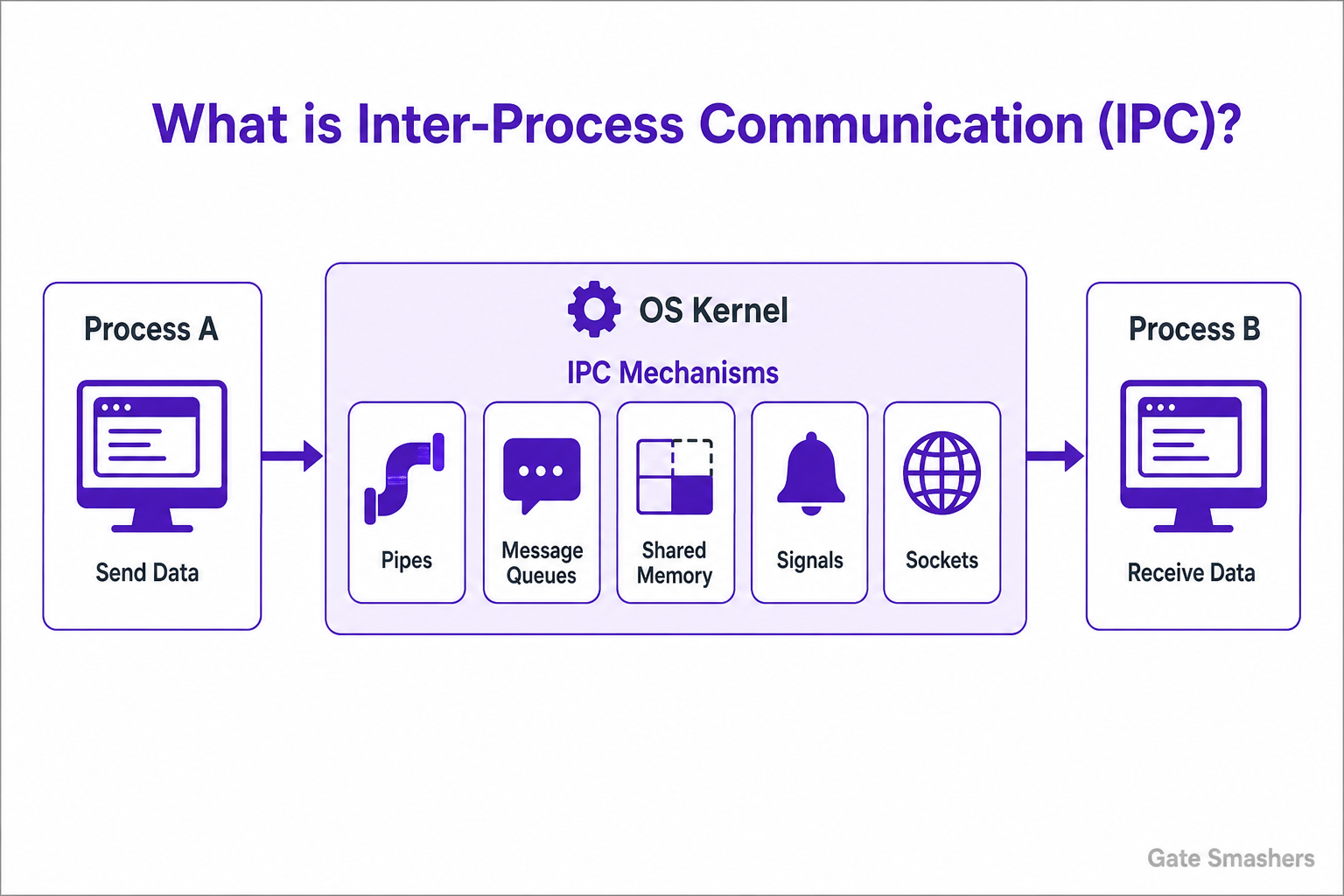
Message-passing mechanisms such as pipes, queues and sockets copy or transfer data through a kernel-managed interface. They provide clear ownership and isolation, and sockets can communicate across machines, but system calls and copying may add overhead.
Shared memory maps the same physical pages into multiple processes and is often the fastest method for large local data. Because the kernel does not automatically coordinate every access, processes must add synchronization such as mutexes, semaphores or atomic operations.
Pipes are simple for related processes, queues preserve message boundaries, shared memory offers high throughput and sockets work across machines. The correct IPC mechanism depends on data volume, relationship between processes, required isolation and whether communication is local or distributed.
19What is the difference between paging and segmentation?
Paging divides memory into fixed-size pages and frames, while segmentation divides a program into variable-size logical regions such as code, data and stack.
With paging, any virtual page can be placed in any free physical frame. This avoids external fragmentation and makes allocation predictable, although the unused space in the final page of an allocation can cause internal fragmentation.
Segmentation matches the programmer's logical view and can apply protection or sharing to meaningful regions. Because segments have different sizes and traditionally require suitable contiguous placement, free space can become scattered into external holes. Modern systems mainly rely on paging, sometimes combined with architectural segmentation support.
Paging is widely used because fixed-size units simplify allocation and remove external fragmentation, although unused space inside the final page creates internal fragmentation. Segmentation matches logical program regions more naturally but makes free-space management and compaction more difficult.
20What is virtual memory, and what is demand paging?
Virtual memory gives each process a private logical address space that is mapped to physical memory. Demand paging loads a page into RAM only when the process first tries to access it.
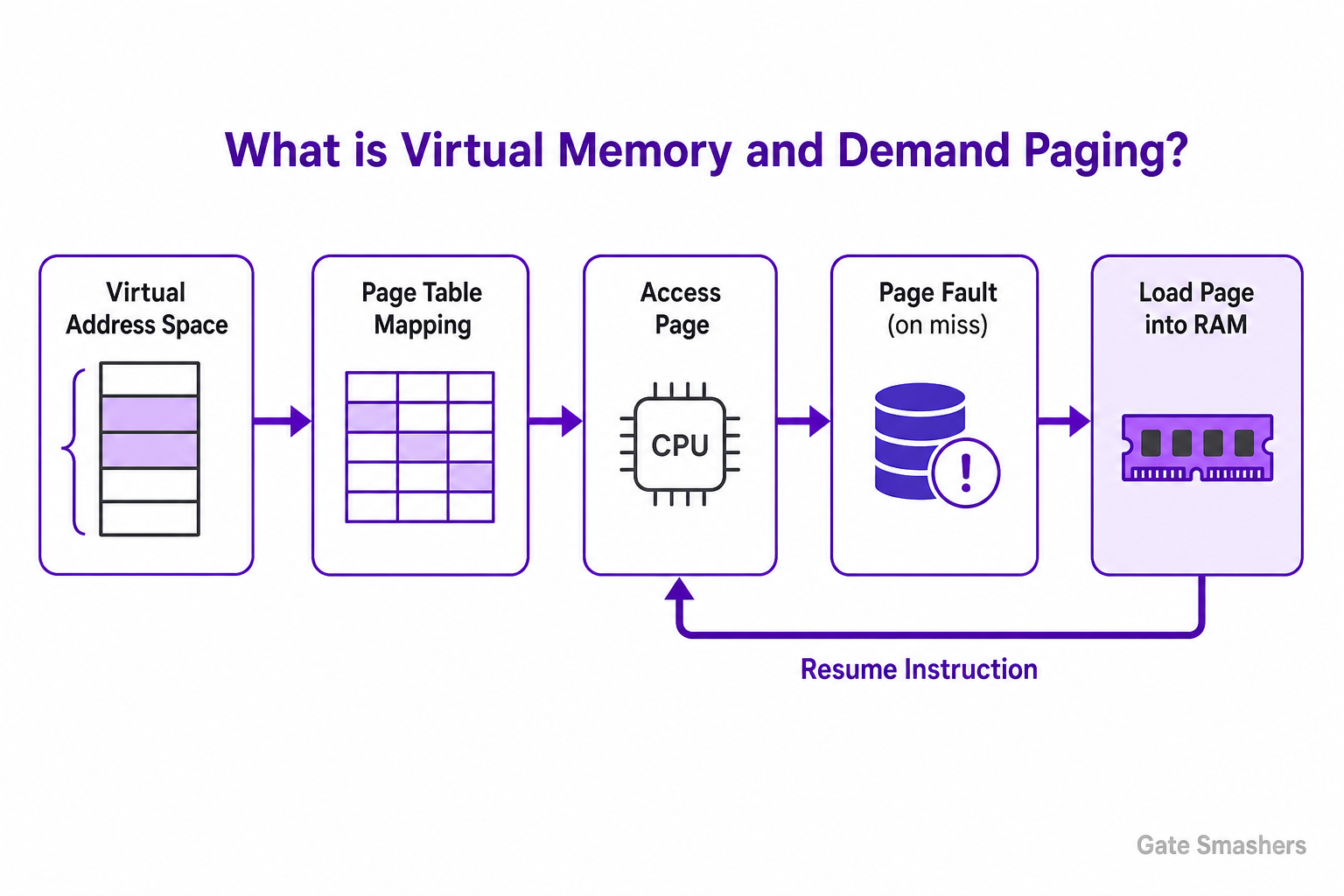
Virtual addresses let the OS relocate processes, isolate their memory and selectively share pages without requiring each program to know where physical RAM is located. Page tables store the mappings and access permissions used by the processor's memory-management unit.
With demand paging, executable and data pages can remain on storage until needed. An access to a valid but non-resident page causes a page fault; the OS loads the page, updates the page table and restarts the instruction. This reduces initial memory use but excessive faults can severely reduce performance.
Demand paging works because programs usually use only a portion of their address space at a given moment. The OS can therefore keep active pages in RAM and leave inactive pages on storage, giving each process the illusion of more memory while paying page-fault cost only when needed.
21What is a TLB, and why is it important?
A Translation Lookaside Buffer is a small, fast hardware cache that stores recently used virtual-to-physical address translations, avoiding a page-table walk on most memory accesses.
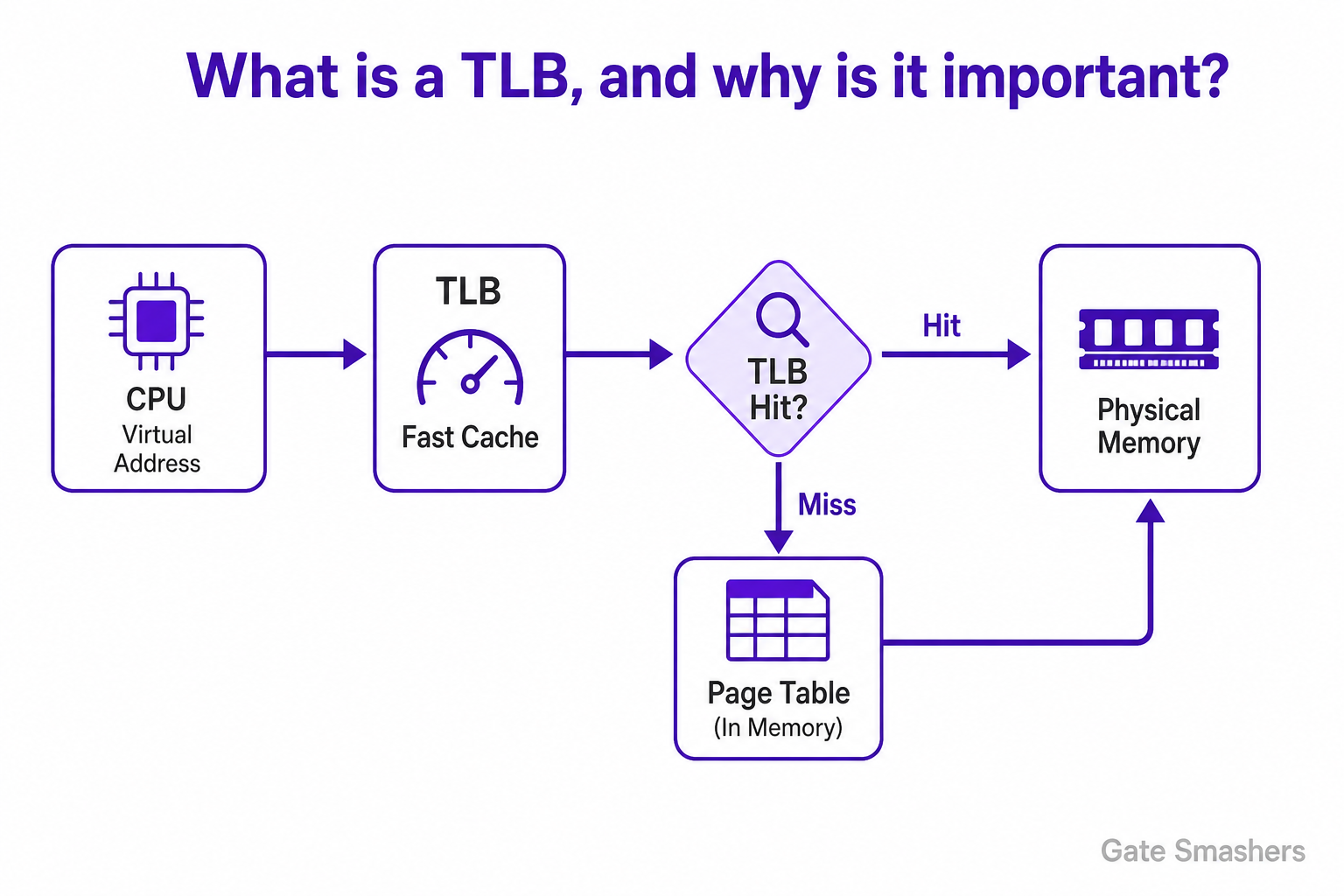
Every ordinary load or store uses a virtual address. Without a cached translation, the processor may need several additional memory accesses to walk a multilevel page table before it can reach the requested data. A TLB hit supplies the frame number and permission bits quickly.
A TLB miss means the translation was not cached; it does not necessarily mean the page is absent from RAM. Hardware or the operating system can fill the TLB from a valid page-table entry. Only an invalid or non-resident mapping that requires OS handling becomes a page fault.
Without a TLB, every memory reference could require one access to read the page-table entry and another to access the actual data. A TLB hit avoids that extra lookup, which is why its hit rate has a large effect on effective memory-access time.
22What is a page fault, and how does the OS handle it?
A page fault is an exception raised when the current page-table mapping cannot complete a memory access. The OS validates the access, obtains the page if valid, updates the mapping and restarts the instruction.
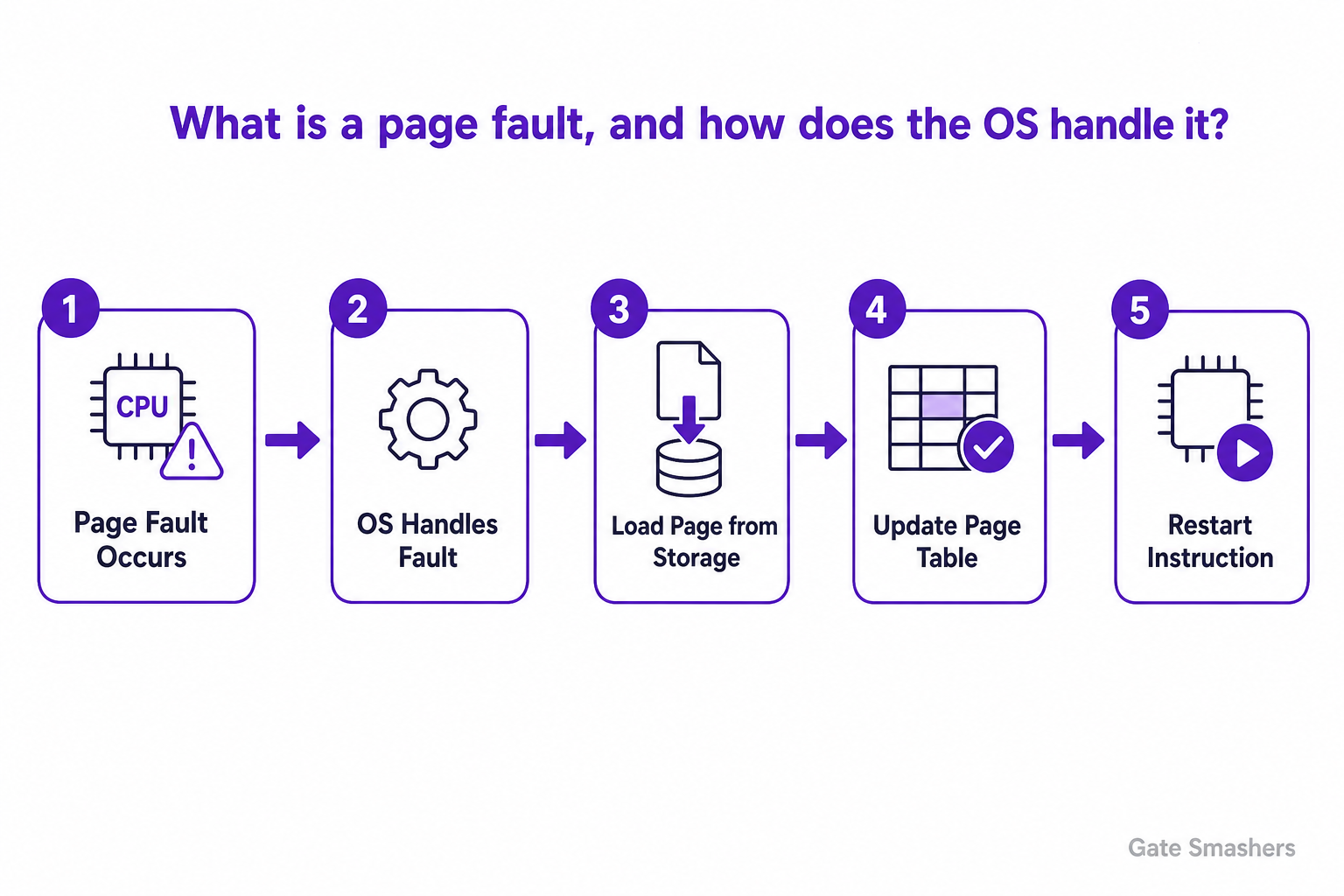
The fault may represent a valid demand-paged access, a write to a copy-on-write page, a permissions violation or an invalid address. The CPU records the faulting address and transfers control to the kernel's page-fault handler.
For a valid non-resident page, the OS finds a free frame or selects a victim, schedules storage I/O, updates the page table and invalidates any stale TLB entry. The blocked process later restarts the same instruction. An invalid or forbidden access normally causes a signal, exception or process termination.
Not every page fault is an error. A valid demand-page fault is part of normal virtual-memory operation, while an invalid address fault indicates that the process accessed memory outside its permitted mappings and normally leads to a protection signal or termination.
23Which page-replacement algorithms should you know, and what is Belady's anomaly?
Know OPT (MIN), FIFO, LRU, Clock/Second-Chance, NRU, aging, and frequency-based policies such as LFU; Random is also a useful baseline. Be able to explain the trade-off between fault behavior and implementation cost. Belady’s anomaly is the case where increasing the number of page frames increases the number of page faults. FIFO is the classic example. It cannot occur in stack algorithms such as OPT and LRU, because their resident sets satisfy the inclusion property as frame count increases.
Core algorithms to know
For an interview, start with the ideal policy, the basic policies, and practical approximations. OPT provides the theoretical minimum number of faults but is not implementable in a normal online system because it requires knowledge of future references.
bullets
- OPT (MIN): Evicts the page whose next use is farthest in the future. It is used as a theoretical benchmark.
- FIFO: Evicts the page that has been resident the longest. It is simple, but arrival order does not necessarily reflect future usefulness.
- LRU: Evicts the page that has not been referenced for the longest time. It exploits temporal locality, but exact LRU can be costly to maintain.
- Clock / Second-Chance: Uses a circular scan and reference bits to approximate recency with lower overhead than exact LRU.
- NRU and aging: Use reference information, and often modification information or aging counters, to make inexpensive approximations to recency.
- LFU, MFU, and Random: Frequency-based policies use reference counts, while Random chooses a victim without recency or frequency information. Frequency policies must account for old history becoming stale.
Stack algorithms and the inclusion property
A stack algorithm has the inclusion property: for a given reference string, the pages resident with m frames are always a subset of those resident with m+1 frames. Therefore, adding a frame cannot increase its number of page faults.
OPT and LRU are stack algorithms. FIFO is not. This distinction is important because stack algorithms cannot exhibit Belady’s anomaly; a non-stack algorithm can, although it does not necessarily do so for every reference string.
Belady’s anomaly
Belady’s anomaly is the counterintuitive result that giving a page-replacement policy more frames can produce more page faults. It is most commonly demonstrated with FIFO.
For the reference string 1, 2, 3, 4, 1, 2, 5, 1, 2, 3, 4, 5, FIFO produces 9 page faults with 3 frames and 10 page faults with 4 frames. The additional frame changes FIFO’s eviction order in an unfavorable way.
The key lesson is that more memory does not automatically imply fewer faults for every replacement policy. It does imply no increase in faults for stack algorithms such as OPT and LRU.
Practical perspective
Real operating systems generally use policies that approximate recency rather than exact OPT or exact LRU. The appropriate choice depends on available hardware reference information, implementation overhead, and workload locality.
Working-set concepts are also important to know: they describe a process’s recent locality and can guide resident-set and replacement decisions, rather than being a single replacement algorithm in the same sense as FIFO or LRU.
24What is thrashing, and how can it be controlled?
Thrashing occurs when processes do not have enough frames for their active working sets, so the system spends most of its time servicing page faults instead of executing useful instructions.
When a process repeatedly evicts pages it will need again soon, page-fault frequency rises and storage activity becomes very high. CPU utilization may fall, which can mislead a naive scheduler into admitting even more processes and making the problem worse.
The OS can reduce the degree of multiprogramming, allocate more frames, prefer local replacement or suspend processes. Working-set models estimate the pages actively used during a recent window, while page-fault-frequency control adjusts allocation when a process crosses configured thresholds.
The OS responds by reducing the number of competing processes, allocating more frames or using a working-set style policy that protects actively used pages. The objective is to restore locality so processes spend most of their time executing rather than repeatedly faulting.
25What happens inside the OS when a program opens and reads a file?
open() makes the kernel resolve the path, check permissions and create an open-file object, returning a file descriptor. read() then copies requested bytes from the page cache or obtains them through storage I/O.
The virtual file system walks path components from the starting directory, consults cached metadata or the concrete file system, follows mount points and symbolic links when allowed, and verifies access permissions. The returned descriptor is an index in the process's descriptor table referencing a kernel open-file description with flags and a current offset.
A read first checks the page cache. If data is present, the kernel copies it to the validated user buffer and advances the file offset. On a cache miss, the file system maps the logical offset to storage blocks, submits I/O through a device driver, blocks the caller if necessary and completes the copy when data arrives.
The pathname lookup is only the start. The kernel must also enforce permissions and maintain a per-process file descriptor that refers to a system open-file entry. Later reads and writes use that descriptor, avoiding a complete path lookup on every operation.
26What is fragmentation? Explain internal and external fragmentation.
Internal fragmentation is unused space inside an allocated block, while external fragmentation is free space split into separate holes that cannot satisfy a larger contiguous request.
Fixed-size allocation rounds requests up to an available block or page size. The unused portion remains reserved for that allocation and creates internal fragmentation. Smaller size classes or block sizes can reduce it, although they may add management overhead.
Variable-size contiguous allocation can leave holes as objects are created and freed. The total free memory may be sufficient but not contiguous, producing external fragmentation. Coalescing adjacent holes, compaction, relocation or non-contiguous paging can address it.
Internal fragmentation wastes space inside an allocated unit and cannot be recovered without changing that allocation. External fragmentation leaves usable free space split across the system. Paging addresses external fragmentation by using fixed frames, but may still waste part of the last page.
27What are the main types of kernels?
The main kernel designs are monolithic, microkernel, hybrid and modular or exokernel-style approaches. They differ mainly in how much operating-system functionality runs in privileged kernel space.
A monolithic kernel keeps core services such as scheduling, memory management, file systems and many drivers in kernel space, enabling efficient direct calls but increasing the trusted code base. A microkernel keeps only essential mechanisms privileged and moves services to isolated user-space processes, improving fault isolation at the cost of more IPC and context transitions.
Hybrid kernels combine microkernel ideas with selected services in kernel space for performance. Modular monolithic kernels can load and unload drivers or subsystems while retaining a common kernel address space. Exokernel-style designs expose protected hardware resources and let application libraries build higher-level abstractions.
Kernel design is a trade-off between performance, isolation and maintainability. Monolithic kernels keep many services together for efficient calls, microkernels move services out for stronger isolation, and hybrid designs retain a larger kernel while borrowing modular ideas from both.
28What is the difference between multiprogramming, multitasking and multiprocessing?
Multiprogramming keeps several programs in memory to keep one CPU busy, multitasking rapidly time-slices tasks for responsiveness, and multiprocessing uses multiple processors or cores for true parallel execution.
In multiprogramming, the CPU switches to another resident job when the current one waits for I/O, improving utilization. Multitasking extends this idea with frequent preemptive switching so interactive users perceive several applications running together.
Multiprocessing adds hardware execution units, allowing work to run simultaneously. Modern operating systems use all three ideas: many programs are resident, tasks are time-sliced on each core and multiple cores execute separate tasks in parallel.
A single modern operating system can demonstrate all three ideas: many programs are kept in memory, tasks appear to run together through rapid switching, and multiple cores execute selected tasks at the same instant. The terms describe different aspects of the same workload.
29What is the difference between an interrupt and an exception?
An interrupt is usually an asynchronous event from external hardware, while an exception is a synchronous event caused by the current instruction or an explicit software trap.
Timers, keyboards, network devices and storage completion signals can interrupt the processor independently of the instruction being executed. The CPU saves enough state, identifies the interrupt source and runs the registered kernel handler.
Exceptions are directly related to execution: examples include divide-by-zero, invalid opcodes, page faults and system-call traps. Some are recoverable and allow the instruction to restart, while others cause a signal or process termination. Both use controlled CPU entry mechanisms, but their sources and timing differ.
A timer interrupt can arrive between instructions regardless of the current program, while a divide-by-zero exception is caused by the instruction being executed. In both cases the CPU saves controlled state and transfers execution to an appropriate kernel handler.
30What is copy-on-write, and why is it useful?
Copy-on-write lets processes initially share the same physical pages as read-only and creates a private copy only when one process attempts to modify a shared page.
After fork(), duplicating every page immediately would consume time and memory even though the child often calls exec() soon afterwards. With copy-on-write, parent and child page tables point to the same physical frames, and the mappings are protected from writing.
A write causes a protection fault. The kernel allocates a new frame, copies that page, updates the writer's mapping and restarts the instruction. Pages that are never modified remain shared. The same idea supports efficient snapshots, zero pages and memory deduplication designs.
The optimization is especially valuable after fork() because the child often calls exec() before changing most inherited pages. Instead of copying the complete address space, the system copies only pages that are actually modified, reducing both launch time and temporary memory use.